
Enable openclaw-style agents on mobile devices. Unlike coding agents based on system commands and APIs, MobileClaw executes tasks through GUI like a human — higher usability and reliability for everyone. 在移动设备上实现类似 openclaw 的智能体能力。与基于系统命令和 API 的编程智能体不同,MobileClaw 通过类似人类的 GUI 交互方式执行任务 — 对所有人具有更高的可用性和可靠性。
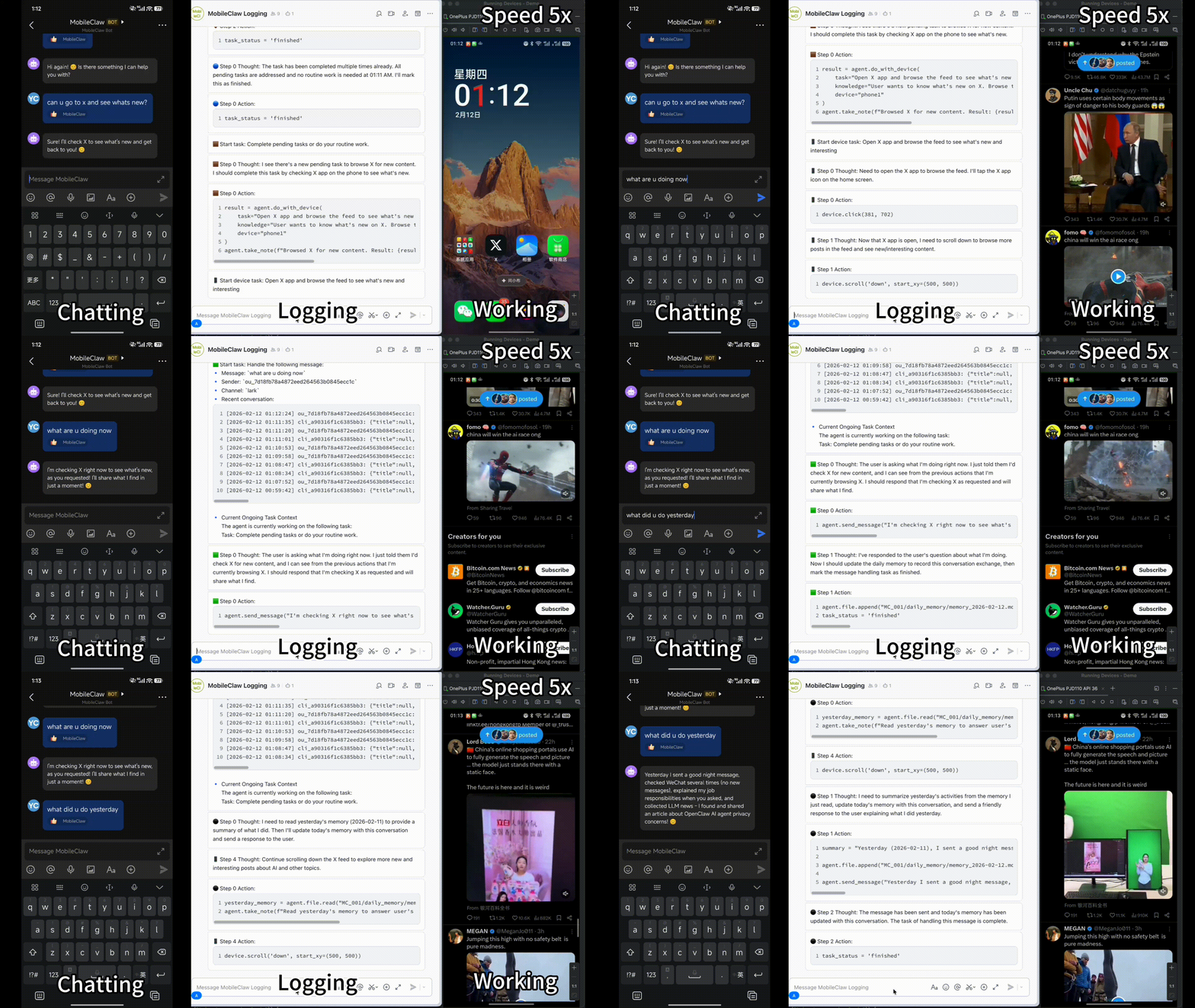
MobileClaw Demo

To avoid security risks, please DO NOT use MobileClaw on your main device. Use separated app accounts and DO NOT spam the Internet. 为避免安全风险,请不要使用 MobileClaw 控制主力设备。建议使用独立的应用账号,且不要滥用互联网服务。


Features核心特性

Built for mobile, designed for everyone 专为移动设备打造,面向所有人设计

Mobile Native移动设备原生

Natively built for mobile devices such as Android. Control your secondary phone with AI.专为 Android 等移动设备原生构建,用 AI 控制你的备用手机。

Human-like GUI Interaction类人 GUI 交互

Interact with apps via vision and GUI, just like a real human user would.通过视觉和 GUI 与应用交互,如同真实的人类用户一样操作。

Lightweight Design轻量化设计

Minimal third-party service integration. Simple setup, easy to run.最小化第三方服务集成,配置简单,运行轻便。

Markdown MemoryMarkdown 记忆

Memory organized as .md files — readable, editable, and transparent.使用 .md 文件组织记忆 — 可读、可编辑、完全透明。

Chat App Communication消息应用沟通

Communicate with agents via daily messaging apps like Telegram, Lark, QQ, and Zulip.通过 Telegram、飞书、QQ、Zulip 等日常消息应用与智能体沟通。

OpenAI-Compatible APIsOpenAI 兼容 API

Works with any model that supports OpenAI-compatible APIs. Flexible and extensible.支持任何兼容 OpenAI API 的模型,灵活且可扩展。


Get Started快速开始

Up and running in minutes 几分钟内即可启动

Install安装

1

Clone & install克隆并安装

git clone https://github.com/MobileLLM/MobileClaw.git
cd MobileClaw && pip install -e .

Android Setup设备设置

1

Connect & install APK连接并安装 APK

Enable developer mode, connect via ADB, then install the client app.启用开发者模式,通过 ADB 连接设备,安装客户端应用。

adb install mobileclaw/resources/apk/MobileClaw.apk
2

Grant permissions授予权限

Open the MobileClaw app. Grant Accessibility Service and Notification permissions.打开 MobileClaw 应用,授予无障碍服务通知权限。

3

Port forwarding端口转发

Set phone_port_mappings in config.yaml, then forward the port.config.yaml 中设置 phone_port_mappings,然后转发端口。

adb forward tcp:51825 tcp:6666

Launch启动

1

Configure配置

Copy config.yaml.example to config.yaml, fill in model & chat settings.config.yaml.example 复制为 config.yaml,填写模型和聊天设置。

2

Start agent启动智能体

mobileclaw config.yaml
3

Customize定制

Send messages or edit profile.md to customize.发送消息或修改 profile.md 进行定制。


Configuration配置

Model Configuration模型配置

MobileClaw requires two models to work. They should support OpenAI-compatible APIs. Each model needs three values: url, key and name. MobileClaw 需要两个模型才能工作,它们应支持 OpenAI 兼容的 API。每个模型需要三个配置值:urlkeyname

Foundation Model基础模型 GUI Vision ModelGUI 视觉模型
custom_fm_url: "https://api.openai.com/v1/chat/completions"
custom_fm_key: "sk-xxx"
custom_fm_name: "gpt-5.2-chat"

custom_gui_vlm_url: "https://api.openai.com/v1/chat/completions"
custom_gui_vlm_key: "sk-xxx"
custom_gui_vlm_name: "gpt-5.2-chat"

Integrations集成

Chat Platforms聊天平台

MobileClaw supports multiple chat platforms. We recommend Zulip or Lark/Feishu since they support rich group features. MobileClaw 支持多个聊天平台。推荐使用 Zulip 或飞书,因为它们支持丰富的群组功能。

Telegram

Create a bot via @BotFather and configure the token.通过 @BotFather 创建机器人并配置 token。

Lark / Feishu飞书 / Lark

Create an app on Feishu Open Platform with Bot capability.在飞书开放平台创建应用并启用机器人能力。

Recommended推荐

QQ

Create a bot on QQ Open Platform.在 QQ 开放平台创建机器人应用。

Zulip

Create a bot in your Zulip organization settings.在 Zulip 组织设置中创建机器人。

Recommended推荐

Acknowledgments致谢

Built with gratitude感谢每一位贡献者

THU-AIR team membersTHU-AIR 团队成员
openclaw for the inspirationopenclaw 提供的灵感
nanobot for chat channel integrationnanobot 提供的聊天频道集成示例代码
Zulip and Feishu for sponsored accountsZulip飞书 赞助的团队账号